Adjusting MP Rotator Nozzles - Simple Installation Guide
What You'll Learn
- Easy-to-remember rhyme for MP Rotator installation
- How to set the arc (coverage pattern)
- Adjusting throw distance up to 20% reduction
The MP Rotator Rhyme
This quick video teaches you an easy rhyme to remember the four steps for installing and adjusting Hunter MP Rotator nozzles.
Ratchet left to set
Adjust the arc by twisting the ring
Fine-tune the throw, up to 20% below
Step-by-Step Breakdown
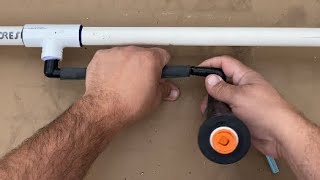
- Twist right till tight: Install the nozzle by turning it clockwise into the sprinkler body until snug
- Ratchet left to set: Turn the entire nozzle counterclockwise to set your left edge stop
- Adjust the arc by twisting the ring: Use the adjustment ring on top to set your coverage arc (90°, 180°, 210°, 360°)
- Fine-tune the throw: Use the radius adjustment screw to reduce throw distance up to 20% if needed
Tip: MP Rotators are designed to match precipitation rates across different arc settings, making system design much easier than traditional spray nozzles.
Related Guides
Related Tools
FAQ
Can I adjust the arc after installation?
Yes! The adjustment ring on top lets you change the arc anytime. Just twist it while the system is running to see your coverage pattern change in real-time.
Why would I reduce the throw distance?
Reducing throw is useful for tight spaces, windy conditions, or when you need to avoid overspray onto sidewalks, driveways, or buildings. You can reduce up to 20% without affecting the nozzle's matched precipitation rate.
Do MP Rotators work on any sprinkler body?
MP Rotators fit standard spray body threads. They work on most Hunter, Rain Bird, and Toro spray bodies. Make sure your system provides adequate pressure (25-45 PSI recommended).